
What actually makes a page findable, readable, and citable, decided before it’s written rather than optimized after it’s built. WorkMatix creates alignment between page structure and search intent during a redesign phase rather than optimizing pages once the website build is finished.
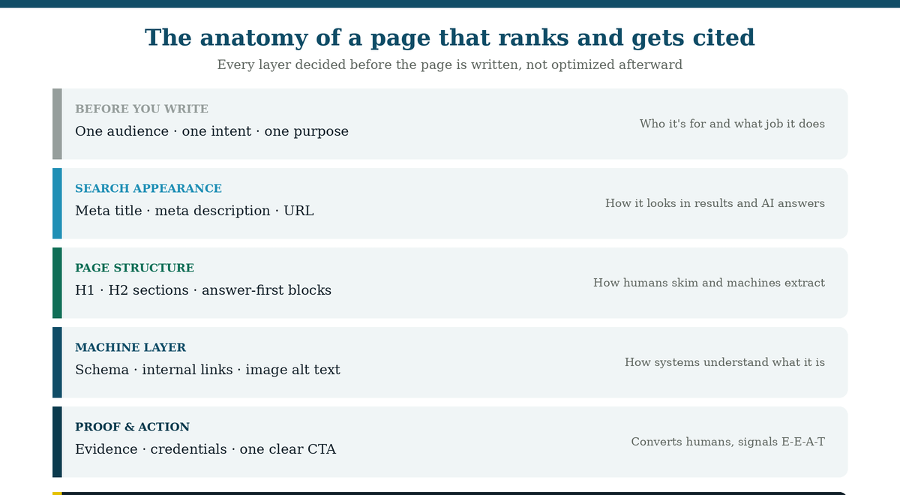
Five layers, all decided before the page gets written.
A page doesn’t become SEO-friendly because someone optimized it afterward.
That’s the pattern most redesigns follow: design the page, write the copy, hand it to whoever owns SEO, and ask them to sprinkle in keywords and a meta description. It produces pages that are technically compliant and strategically empty, pages that satisfy a checklist without ever having been designed to answer a real question.
An SEO-friendly page is one that was specified before it was built: one audience, one intent, one job, with the structure, markup, and proof that let humans, search engines, and AI systems all understand what it is. That specification is what a page brief captures, and this guide walks through what belongs in one and why each part matters.
Start with one page, one purpose
Before anything else, decide who the page is for and what single job it does. Pages with mixed intent underperform for everyone: they get rewritten by search engines, skimmed past by readers, and skipped by AI systems that can’t tell what question the page answers.
Two fields settle this. Target audience names which buyer the page serves, because a page written for a technical evaluator reads differently from one written for the executive who signs. Search intent names what the visitor is trying to accomplish: understand something (informational), compare options (comparative), or act (transactional).
These two decisions cascade through everything else. Intent determines the right format, and format mismatch is one of the most common reasons good pages lose visibility. An informational query wants an explainer; a comparison query wants a structured comparison; a transactional query wants a page built to convert. Writing a beautiful deep explainer to win a “best option” query loses to a well-built comparison page every time, regardless of writing quality.
A useful test before you write a word: can you state, in one sentence, who this page is for and what they want from it? If not, the page isn’t ready to be written, and it may not need to exist.
Get the search appearance right
Your meta title, meta description, and URL are the advertisement for the page, and they’re the highest return per minute in on-page work. They decide whether a ranking earns a click at all.
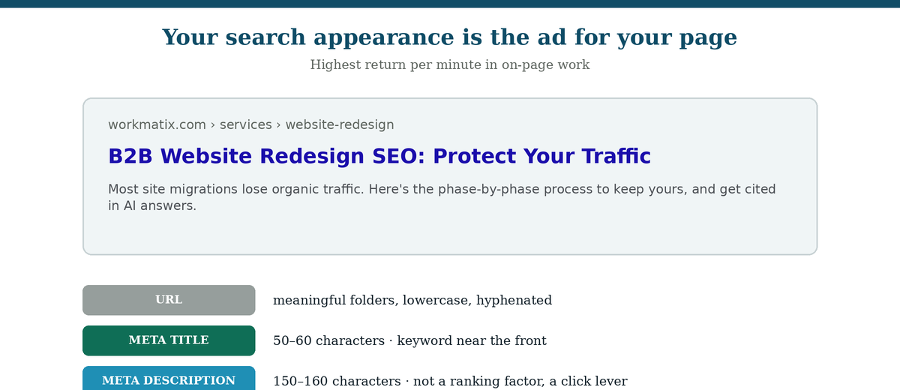
Meta title. Aim for roughly 50 to 60 characters so it displays without truncating and put the primary keyword near the front. This is a display guideline rather than a hard rule, search engines read longer titles, screens just cut them off. Make each one unique and genuinely descriptive of the page. Note that analysis of over 950,000 pages found Google rewrites title tags roughly a third of the time, and longer titles are rewritten far more often. If yours keep getting rewritten, check your H1, since that’s commonly what gets used instead.
Meta description. Write 150 to 160 characters that state the benefit and give a reason to click. It isn’t a direct ranking factor, but it’s a significant lever on click-through rate, and modern search interfaces sometimes pull from it or from your opening paragraph when assembling summaries. Never duplicate descriptions across pages.
URL. Lowercase, hyphenated, short, and meaningful. A path that shows where the page sits in your structure tells both a reader and a machine something useful before the page even loads.
Structure the page so both humans and machines can follow it
Use one H1 and a clean, meaningful heading hierarchy, then lead each section with a direct answer. Structure does double duty now: it helps people skim, and it defines the passages that featured snippets, AI Overviews, and chat assistants can lift.
One H1 per page, stating the primary topic. Multiple H1s dilute the signal and make the hierarchy harder to parse. Your H1 and meta title should be closely related but not identical, they’re doing different jobs in different places.
H2s for major sections, each descriptive enough to stand alone. “How long should a meta description be?” tells a reader, a crawler, and an AI system exactly what follows. “Getting the details right” tells nobody anything. Phrase headings as the questions your buyers actually ask. Nest H3s properly underneath rather than jumping levels, and never use heading tags for visual sizing, that’s what styling is for.
Answer first, then elaborate. Open each section with a direct, self-contained answer in roughly the first 40 to 60 words, before the context and setup. AI systems can extract that cleanly without parsing your introduction. Writing in self-contained blocks matters too: research on citation behavior found that clear, standalone chunks of roughly 50 to 150 words are cited substantially more often than long unbroken prose, because a chunk that makes sense on its own is a chunk that can be quoted.
Add structure wherever the content allows. Bulleted lists, numbered steps, and comparison tables reduce the interpretation work a machine has to do and give readers something to scan. Content with tables and structured data is cited materially more often than unstructured prose.
One honest caveat: controlled experiments suggest heading structure alone has limited direct ranking impact. Its real value is comprehension, for readers, for snippet extraction, and for retrieval systems deciding which passage answers which question.
Cover the topic, not just the keyword
Assign each page a primary keyword and a set of supporting terms that reflect how the topic is genuinely discussed. The goal isn’t repetition; it’s demonstrating that the page covers the subject.
Supporting keywords aren’t synonyms padded in for density. They’re the related concepts, entities, and sub-questions that anyone genuinely covering the topic would address. A page about on-page SEO that never mentions title tags, headings, internal links, or schema is visibly incomplete to a system assessing topical depth.
This connects to how AI systems retrieve. When a model receives a question, it typically breaks it into several sub-queries and searches each. Being the best answer to that cluster of sub-questions is what earns a citation, and you can only do that if the page actually covers them.
Add the machine layer: schema, links, and alt text
Schema markup, internal links, and image alt text are how systems understand what a page is and how it relates to everything else. These are page-brief decisions, not post-launch cleanup.
Schema by page type. Decide which structured data each page needs based on what it is: Organization and Service for service pages, Article for posts, FAQPage for question sections, and so on. Schema removes ambiguity for machines about what they’re reading. One rule that trips people up: structured data must match the visible content on the page. Marking up content that isn’t actually there risks losing rich-result eligibility entirely.
Internal links, specified in advance. List the pages this one should link to and the pages that should link to it, before it’s built. Use descriptive anchor text that names the destination topic. Make sure links are real, crawlable anchor elements with href attributes, JavaScript-only links, empty anchors, and missing hrefs are a common and invisible failure. A practical target is a handful of strong, relevant internal links per page rather than a scattering of weak ones.
Images and alt text. Plan what each image is, where it goes, and what its alt text says. Alt text serves accessibility first, and it also tells search systems what the image depicts. Compress images properly, since page speed affects both user experience and how efficiently your site gets crawled.
Design the conversion layer, and let your proof work twice
Every page needs one clear primary action, and the evidence you use to earn that action also supplies the trust signals search and AI systems look for. This is the part most SEO guides leave out, and it’s where the two goals stop competing. Start with the conversion basics. Give the page one primary CTA rather than several competing ones. Place it where the reader will have finished forming a judgment, not before. Keep forms proportional to the commitment being asked. And make sure the action matches the intent: an informational page that demands a demo booking is asking for a decision the visitor hasn’t reached yet.
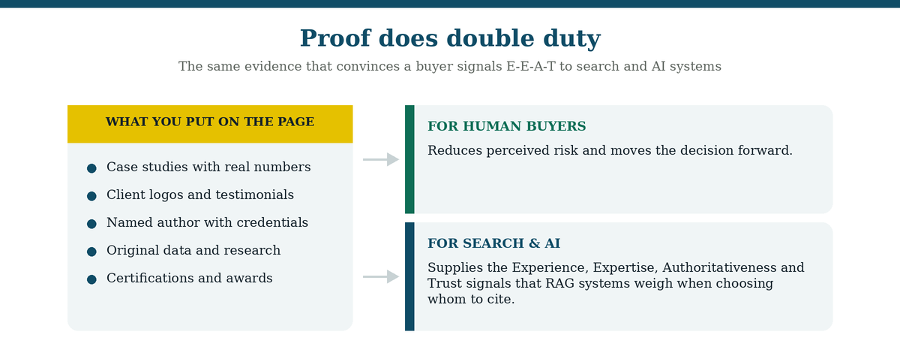
The same proof that reduces buyer risk also signals expertise and trust to machines.
Now the part worth internalizing. The proof elements you add for human buyers, case studies with real numbers, named authors with credentials, client logos, original data, certifications, are the same signals that search engines and AI systems use to judge whether your content is reliable. You’re not choosing between conversion and visibility. You’re building one asset that serves both.
How E-E-A-T changes in AI search
E-E-A-T (Experience, Expertise, Authoritativeness, Trustworthiness) is the framework Google uses to assess whether content is reliable and written by people with genuine subject knowledge. In AI search it stops being a soft guideline and becomes a practical constraint on whether retrieval systems will cite you at all. Here’s how each element translates:
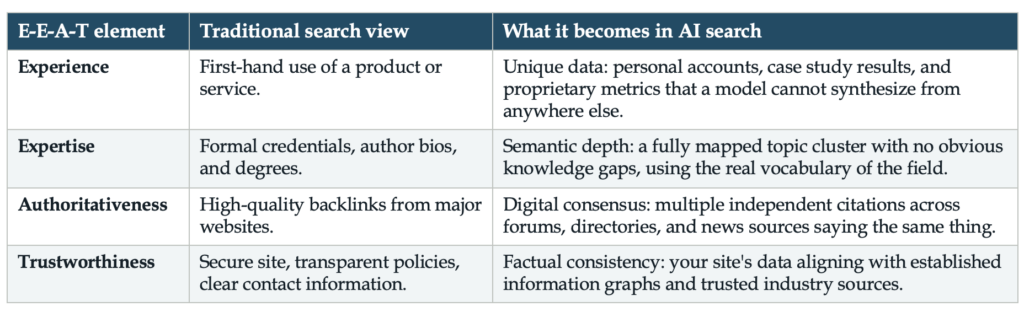
Two implications follow from that right column. First, original data is the strongest content-level lever you have, a large share of AI citations trace back to first-hand information rather than summarized secondary sources. Second, being corroborated elsewhere matters as much as what’s on your page: research on citation behavior found brand authority to be the strongest single predictor of whether a source gets cited, and brands present across several independent platforms substantially more likely to appear than single-platform brands.
Which means a case study page with real numbers, a named author, and a client willing to be quoted isn’t just a conversion asset. It’s one of the few things you can publish that a model genuinely cannot get anywhere else.
Put it in a SEO brief before you build it
Capture all of these decisions in a page brief, one per page, before anyone writes or designs. The brief is what turns “make it SEO-friendly” from a vague instruction into a specification someone can actually execute. A complete brief for a single page covers:
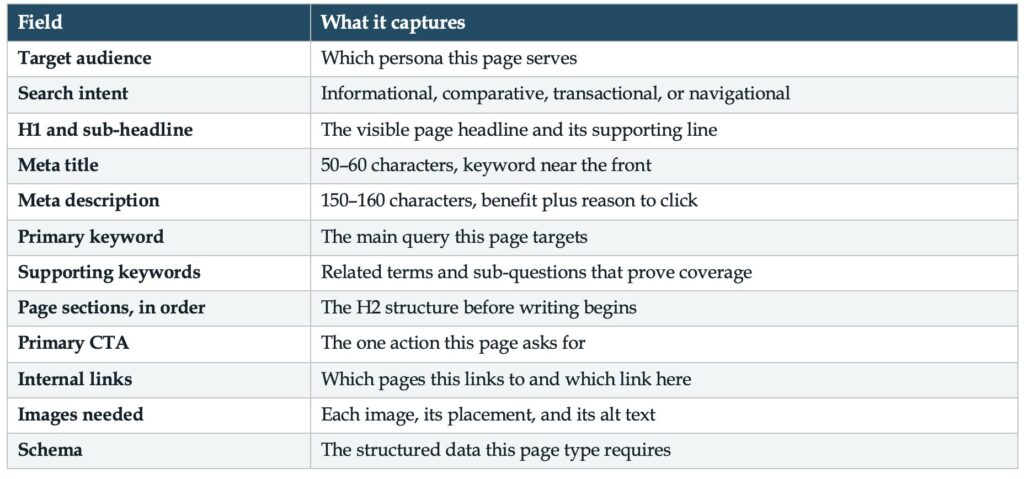
Fill this in for every page on the new site and the redesign stops being a series of judgment calls made under deadline. Writers know what they’re writing and why. Designers know what has to fit. Developers know what markup is needed. And when someone asks why a page exists, the answer is already documented.
This is the level the Site Architecture & Migration Master works at, one row per page, carrying strategy from the intent map through to the brief, so the plan and the build stay connected. But the discipline matters more than the tool: a brief in a shared doc beats an unwritten intention every time.
Where this fits in the redesign
Page-level work comes after strategy and architecture, not before. You need to know your audience and intents first, then how the site is structured, and only then what each individual page should be. Building pages before the architecture is settled means rewriting them when it changes.
For the full sequence, from discovery through launch and post-launch monitoring, see the Website Redesign SEO & AI Search Readiness Roadmap. For the structural decisions that come immediately before this stage, see Website Architecture Ideas for an SEO and AI-Search-Ready B2B Redesign.
Frequently asked questions
What makes a page SEO-friendly?
A page built for one audience and one intent, with a descriptive meta title and description, a single H1 and clean heading hierarchy, answer-first sections, relevant internal links, schema matching the visible content, optimized images with alt text, and genuine proof of expertise. The decisions are made before writing, not added afterward.
How long should a meta title and meta description be?
Aim for roughly 50 to 60 characters for the title, with the primary keyword near the front, and 150 to 160 characters for the description. These are display guidelines rather than hard rules; longer text is read but truncated on screen. Google rewrites roughly a third of title tags, more often when they’re long or vague.
How many H1 tags should a page have?
One. A single H1 states the page’s primary topic. Multiple H1s dilute that signal and make the content hierarchy harder for both crawlers and retrieval systems to parse. Use H2s for major sections and H3s nested beneath them.
Does E-E-A-T matter for AI search?
Yes, and arguably more than for traditional ranking. In AI search, Experience becomes unique first-hand data, Expertise becomes demonstrable topical depth, Authoritativeness becomes independent corroboration across multiple sources, and Trustworthiness becomes factual consistency with established references. These are the signals retrieval systems weigh when choosing whom to cite.
Do conversion elements hurt SEO?
No, when they match the page’s intent. A single clear CTA placed after the reader has enough information serves both goals. And proof elements like case studies, named authors, and original data do double duty: they reduce buyer risk and supply the expertise and trust signals search and AI systems look for.
What is an SEO page brief?
A short specification written before a page is built, capturing its audience, intent, H1, meta title and description, primary and supporting keywords, section structure, primary CTA, internal links, images with alt text, and required schema. It turns “make it SEO-friendly” into something a writer, designer, and developer can each execute.
Working out which schema each page type needs? The Intent-to-Schema Cheat Sheet for B2B Websites maps every common B2B page type to the structured data it needs to be understood and cited in AI search.
Google’s guidance on creating helpful, reliable content describes what a page has to do for a reader before any of this structure matters.