


Ten architecture decisions that determine whether your new site gets found, ranked, and cited, made before anyone opens a design tool.
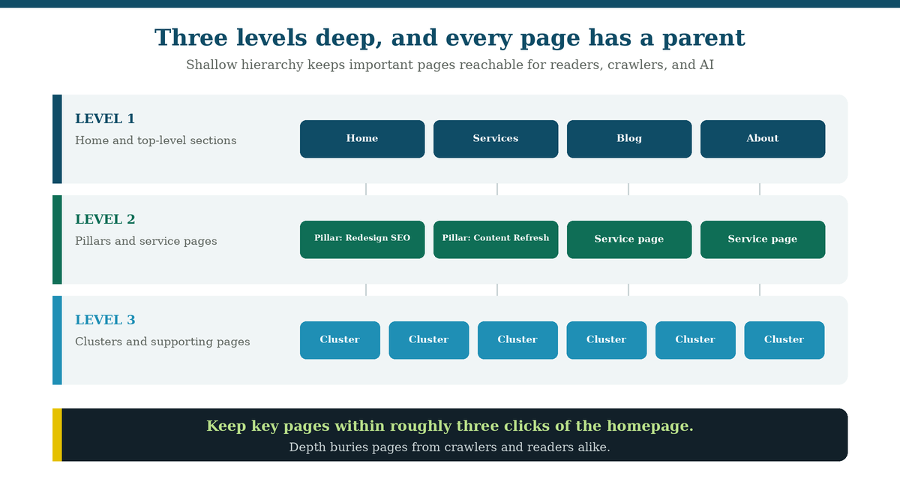
Three levels deep, every page with a parent, nothing important buried.
Website architecture is the least visible decision in a redesign and the most expensive one to reverse.
Nobody praises your URL hierarchy. No stakeholder reviews your internal linking plan. But architecture determines which pages search engines can reach, how authority flows between them, whether your topical depth is legible to an AI system, and how much of your search equity survives the migration. Get it right and everything downstream is easier. Get it wrong and you’ll be paying for it in retrofits for years.
Here are ten architecture decisions worth making deliberately, roughly in the order you’ll face them. They apply whether you’re a marketing leader planning an enterprise redesign or a consultant rebuilding your own site.
Quick summary: the ten ideas to make your new website SEO & AI search-ready
- Start from a merged constellation, not your org chart
- Build the site map in three passes, existing pages first
- Give every page a journey stage, an intent, and a persona
- Keep hierarchy in navigation, not buried in URLs
- Stay within about three clicks of the homepage
- Design URL folders that mean something
- Architect in pillars and clusters, not isolated pages
- Treat internal linking as architecture, not decoration
- Default to subdirectories for multilingual, and get hreflang right
- Make the structure legible to AI systems, not just crawlers
1. Start from a merged constellation, not your org chart
Architecture should reflect how your buyers search, not how your company is organized. The most common structural mistake in B2B is a site map that mirrors internal departments: a page per service line because that’s how the team is split, a section per product because that’s how the roadmap is managed. Buyers don’t search that way.
The alternative is to start from your topic constellations, the connected sets of pillar and cluster content that cover a subject completely. But there’s a wrinkle most B2B sites hit immediately: you probably serve more than one buyer. Most B2B companies have two to four distinct personas, and each has their own constellation.
So, merge them before you build. Lay each persona’s constellation side by side and identify where they overlap and where they diverge. Some pillars serve every persona; those become primary structural sections. Some clusters matter to only one; those sit deeper. Tag each pillar with which personas it serves, and you’ll immediately see which parts of the site carry the most weight, and which audience is currently underserved by your structure.
This one exercise prevents two chronic problems: building separate near-duplicate sections for audiences that actually want the same content and quietly ignoring a secondary persona because nobody mapped their journey.
2. Build the site map in three passes, existing pages first
Build the new site map in a specific order: existing pages that migrate, then new pages your strategy requires, then structural pages that hold it together. The order matters more than it sounds.
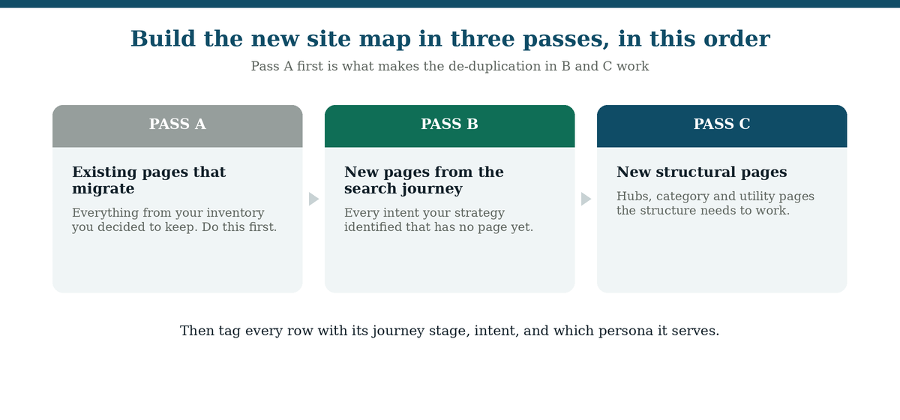
Pass A first is what makes de-duplication in passes B and C work.
Pass A: existing pages that migrate. Start with everything from your content inventory you’ve decided to keep. Doing this first gives you a factual picture of what already exists, which is what stops you from planning a “new” page in pass B that duplicates something you already have.
Pass B: new pages the search journey requires. Now add every intent your strategy identified that has no page yet. These come from your content mapping, not from a brainstorm, so each new page arrives with a documented reason to exist.
Pass C: new structural pages. Finally, add the hubs, category pages, and utility pages the structure needs to function. These often get forgotten until late and then get bolted on awkwardly.
Skip the order and you get the classic redesign artifact: a site map with three pages covering the same topic because different people added them at different times.
3. Map out every page to a search journey stage, intent, and a persona
Every row in your site map should carry three tags: which search journey stage it serves, what intent it satisfies, and which persona it’s for. If a page can’t be tagged, that’s your signal it may not belong.
The journey stages are straightforward for B2B: information search and exploration, consideration and comparison, and decision. Mapping pages to stages exposes gaps fast. Most B2B sites are heavy on decision-stage pages (services, pricing, contact) and thin on the exploration content buyers actually use to build a shortlist.
Intent tagging does something similar at page level. When you label each page informational, comparative, transactional, or navigational, two things surface: pages competing for the same intent (which will cannibalize each other), and intents with no page at all.
And persona tagging tells you whether your structure is actually serving everyone you claim to serve. If one persona has four pages and the other has fourteen, that’s a strategic decision you should be making on purpose rather than discovering after launch.
4. Keep hierarchy in navigation, not buried in URLs
Hierarchy and URL structure are two different problems, and conflating them creates unnecessarily deep, brittle URLs. A page’s position in your site’s hierarchy, which section it belongs to, what its parent is, is a navigation question. It does not have to be encoded in a five-segment URL path.
The practical separation: your site map defines what pages exist; your navigation structure defines what appears in menus and at what depth. Only pages that actually appear in a menu need their hierarchy resolved for navigation purposes. Everything else needs a clean URL and a clear internal-linking path.
This keeps URLs short and stable, which matters because every layer of nesting is another thing that can change and require a redirect later.
5. Stay within about three clicks of the homepage
Keep important pages reachable within roughly three clicks. Depth is not neutral. The further a page sits from your homepage, the less internal authority reaches it, the less often crawlers revisit it, and the less likely a human is to ever find it.
Three levels covers most B2B sites comfortably: level one for home and top-level sections, level two for pillars and service pages, level three for clusters and supporting content. If something important is landing at level four or five, that’s usually a signal your structure is organized around internal categories rather than user journeys.
A related check: orphaned pages, pages with no internal links pointing to them, are effectively invisible regardless of depth. They’re easy to accumulate over years and easy to miss in a redesign, so audit for them explicitly.
6. Design URL folders that mean something
URL structure should communicate topical organization at a glance, to humans and machines. A path like /services/website-redesign/ tells a reader and a crawler exactly where they are and what this content belongs to. A path like /page-id-4471/ tells them nothing.
Some practical rules that hold up well:
- Use lowercase, hyphens between words, no underscores or spaces.
- Keep segments short and descriptive; drop stop words that add length without meaning.
- Group related content in consistent folders so topical clusters are visible in the URL itself.
- Avoid dates in URLs for evergreen content, since they make a page look stale and make refreshes awkward.
- Decide your trailing-slash and www conventions once, then enforce them, inconsistency creates duplicate-URL problems.
One caution specific to redesigns: changing URLs has a real cost. Every changed URL needs a redirect, and every redirect is a small tax on speed and equity. Change them when the new structure is genuinely better, not for cosmetic tidiness.
7. Architect in pillars and clusters, not isolated pages
Organize content as hubs: a pillar page covering a topic broadly, with cluster pages going deep on its parts, all interlinked. This structure is what demonstrates topical depth rather than merely claiming it.
The mechanism is simple. A pillar establishes that you cover a subject. Clusters prove it by covering each sub-topic properly. Internal links between them make the relationship explicit, so a crawler or an AI system encountering one page can see the surrounding depth.
This matters more than it used to. Topical authority is increasingly how smaller sites compete: a site that covers one subject exhaustively can outperform a much larger general publication for citations in that niche. You don’t have to be the biggest domain. You have to be the most complete one on your topic.
Build order follows from this: pillars first, then clusters, then the internal links that connect them. Building clusters before their pillar exists means rewiring links later.
8. Treat internal linking as architecture, not decoration
Internal links are structural infrastructure; they route authority and define relationships. Most redesigns treat them as a content-editing afterthought, which wastes one of the few architectural levers you fully control.
Three principles worth building in deliberately. First, link with descriptive anchor text that names the destination topic, since anchor text is a relationship signal, not just a click target. Second, ensure every cluster links to its pillar and the pillar links back, that reciprocal connection is what makes a hub legible. Third, route links toward the pages that matter commercially, because authority flows along links and you get to decide where it goes.
During a migration specifically, watch for internal links pointing at old URLs. They’ll technically work through redirects, but chained redirects dilute equity and slow the page. Update them to point directly at final destinations.
9. Default to subdirectories for multilingual, and get hreflang right
For most B2B sites adding languages, subdirectories are the right default. The three options are not equally good, and the decision is more settled than the debate suggests.
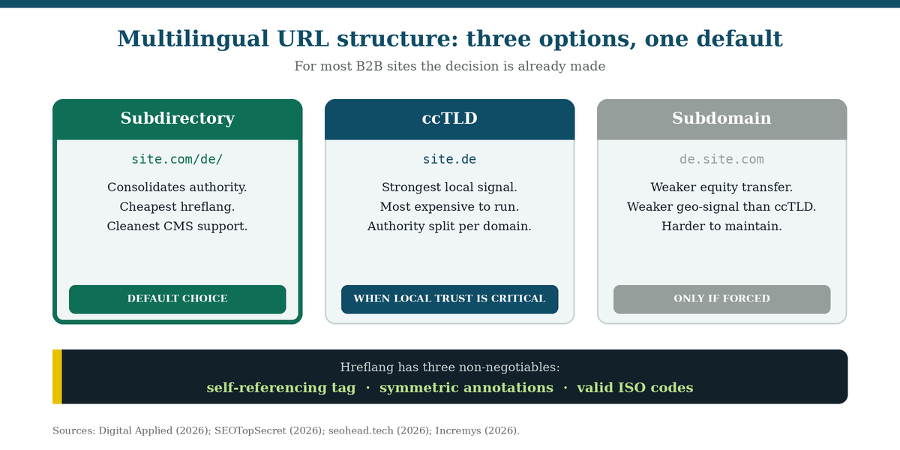
Subdirectories consolidate authority and keep hreflang simple.
Subdirectories (site.com/de/) keep everything under one domain, so authority consolidates rather than fragmenting. They’re the cheapest to operate and have the cleanest CMS support.
ccTLDs (site.de) send the strongest local signal and are the right call when regional trust genuinely matters, but they split your authority across domains and demand real operational investment: separate content, separate link building, separate teams.
Subdomains (de.site.com) are the option to avoid unless architecture forces them. They transfer link equity less reliably than subdirectories and send a weaker geographic signal than ccTLDs, while costing more to maintain than either.
First, distinguish two things people conflate: multilingual means different languages, multi-regional means different regions that may share a language (en-us versus en-gb). They call for different decisions, and multi-regional needs genuine localization, not just translation.
The hreflang rules that actually break sites
Hreflang is how you tell search engines which version serves which audience, and it has three requirements that are genuinely non-negotiable. Miss any one and the entire cluster gets ignored:
- Every page includes a self-referencing hreflang tag.
- Annotations are symmetric: every page in the cluster references every other page.
- Language codes are valid ISO values, language first, optional region second.

The failures that show up most often in audits: a region code with no language (hreflang=”US” is invalid; it needs “en” or “en-US”), canonical tags on translated pages pointing back to the English original (which guarantees the translation never gets indexed), automatic IP-based redirects (crawlers arrive from one country and never see the other versions, so use a suggestion banner instead), and a single sitemap with no locale separation.
One strategic point that gets missed: keyword research has to be done per market. What buyers search in one country is not a translation of what they search in another. Running one content plan through a translator produces pages that read correctly and match nothing.
10. Make the structure legible to AI systems, not just crawlers
AI systems retrieve and cite content differently than search engines rank it, and architecture affects both. A structure that ranks fine can still be hard for an AI system to parse and quote.
Four architectural choices carry the most weight here:
- Semantic heading hierarchy. H1 to H2 to H3 nesting is how retrieval systems understand which answer belongs to which question. Choose heading levels for meaning, not visual size.
- Schema mapped by page type. Decide at the architecture stage which structured data each page type needs, so it gets built in rather than retrofitted. Structured data is how you remove ambiguity about what a page is.
- Visible topical depth. The pillar-and-cluster structure isn’t only an SEO pattern; it’s the evidence an AI system uses to judge whether your site genuinely covers a subject.
- Server-rendered content. Some AI fetchers do not execute JavaScript. Content that appears only after JS runs may be invisible to them, which makes rendering an architecture-level decision, not just a performance one.
Underneath all four is a single idea: you’re now building for three audiences at once, human visitors, search engines, and AI systems. They overlap, but a site built for only the first two can be invisible to the third.
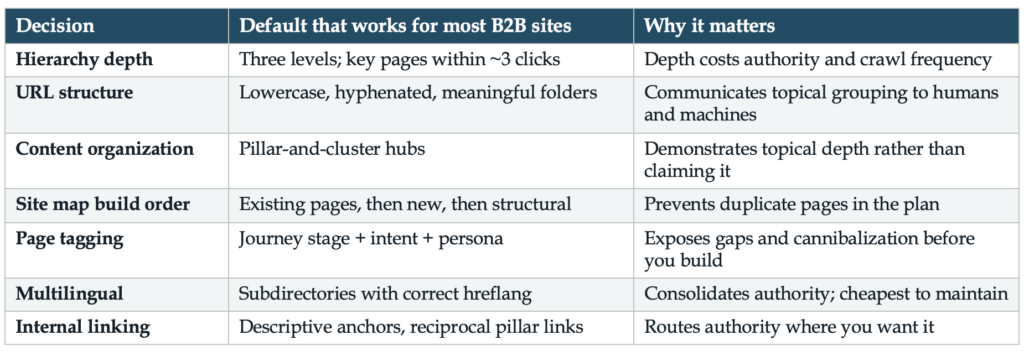
Where architecture fits in the redesign
These decisions belong in the strategy phase of a redesign, after you’ve decoded your audience and mapped intent, and before anyone builds a page. That sequence is deliberate: architecture is the translation layer between what you learned about buyers and what actually gets built.
For the full phase-by-phase picture, including how architecture connects to migration, redirects, and post-launch monitoring, see the Website Redesign SEO & AI Search Readiness Roadmap.
If you’d like the structure of this thinking as a working document, WorkMatix builds it into the Site Architecture & Migration Master, where the site map, navigation structure, page briefs, and redirect map live in one place and feed each other. But the ideas above are useful whether you use a template or a spreadsheet you build yourself.
Architecture is one decision inside a larger sequence, and it constrains everything that follows it. The Website Redesign SEO & AI Search Readiness Roadmap shows where it sits and what depends on it.
Frequently asked questions
What is website architecture in SEO?
Website architecture is how pages are organized and connected: hierarchy, URL structure, navigation, and internal linking. It determines which pages search engines and AI systems can reach, how authority flows between them, and how clearly your topical depth is communicated.
How deep should a website hierarchy be?
Keep important pages within roughly three clicks of the homepage. Three levels, top-level sections, pillars and service pages, then clusters and supporting content, covers most B2B sites. Pages deeper than that receive less internal authority and get crawled less often.
Should I use subdirectories or subdomains for different languages?
Subdirectories (site.com/de/) are the right default for most B2B sites: they consolidate domain authority, keep hreflang simple, and have the best CMS support. Use ccTLDs when local trust signals genuinely matter and you can resource them. Avoid subdomains unless technical constraints force them.
What are the most common hreflang mistakes?
Missing self-referencing tags, non-symmetric annotations, invalid language codes (a region code alone, like “US,” is invalid), canonical tags on translated pages pointing to the original language, and automatic IP-based redirects that prevent crawlers from seeing other versions. Any of the first three causes search engines to ignore the whole cluster.
Does site architecture affect AI search visibility?
Yes, website architecture does affect AI search visibility. Semantic heading hierarchy helps retrieval systems match answers to questions, schema removes ambiguity about what a page is, pillar-and-cluster structure evidences topical depth, and server-rendered content ensures AI fetchers that don’t execute JavaScript can read your pages at all.
Should I change my URLs during a redesign?
Only when the new structure is genuinely better. Every changed URL needs a 301 redirect, and redirects carry a small cost in speed and equity. Changing URLs for cosmetic tidiness adds risk without benefit; changing them to fix a structure that buries content is worth it.
Planning a redesign and want to pressure-test your architecture before anyone builds? The Master Website Checklist for AI Readiness covers what search engines and AI systems need from your structure, page by page.
Google’s documentation on consolidating duplicate URLs explains why architecture decisions and canonical decisions are the same decision.