


Thirty-two checks across five phases, in the order they have to happen, with the reasoning behind each one.
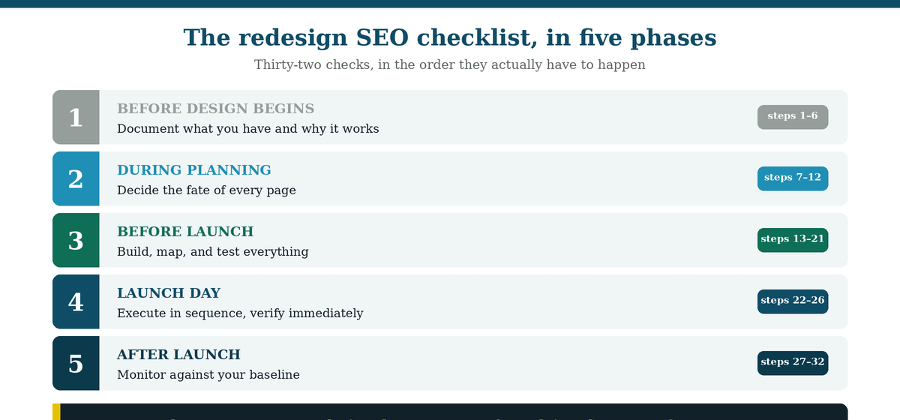
Most redesign checklists are lists of things to remember. This one is a sequence.
That distinction matters more than it sounds, because the majority of redesign damage doesn’t come from forgetting an item. It comes from doing the right things in the wrong order: mapping redirects after the new URLs were already decided, auditing content after the new structure was signed off, discovering which pages carry backlinks after those pages were already cut.
So, this is organized chronologically rather than by category. Each item includes why it matters, because a checklist you understand is one you can adapt when your project doesn’t match the template, and no project ever quite does.
A note on scope: this covers what a marketing leader needs to know and decide. The technical execution, implementing redirects, configuring servers, shipping code, belongs to your developers. Your job is making sure nothing gets skipped.
Phase 1: Before design work begins (steps 1–6)
Document what you have and why it performs, before anyone can change it. This phase is pure information gathering, and skipping it is the root cause of most redesign losses. You cannot protect what you haven’t identified.
1. Export twelve months of Google Search Console data. Clicks, impressions, and positions by page and query. This tells you which pages actually earn traffic, which is rarely the same as which pages the team assumes matter. On most sites, a small handful of pages carry the majority of organic traffic.
2. Pull your backlink profile and document every URL with external links. These pages need protection even when their content is weak, because the authority those links confer is tied to the specific URL. Most pages on any site have no backlinks at all, which makes the ones that do disproportionately valuable.
3. Crawl the current site and export every URL. Status codes, titles, meta descriptions, canonical tags, and internal links. This becomes your inventory, and the base layer of everything downstream.
4. Record current on-page elements for your top pages. Titles, headings, keyword focus, and image alt text on the pages that rank. These are the things most easily lost in a rebuild, and image alt text in particular tends to be discarded silently during migration.
5. Set up rank tracking at least a week before launch. You need stable pre-launch numbers to compare against. Starting tracking on launch day gives you no baseline, which means you’ll be unable to tell a normal dip from a real problem.
6. Establish an AI visibility baseline. Ask ChatGPT, Perplexity, and Gemini the questions your buyers ask, and record whether you appear, how you’re described, and who gets cited instead. AI visibility won’t show up in a rankings report, so without this you have no way to know whether the redesign helped or hurt it.
Phase 2: During planning (steps 7–12)
Decide the fate of every page while decisions are still cheap. This is where the redesign stops being a design project and becomes a search strategy. Every choice here is reversible on paper and expensive to reverse after the build.
7. Give every existing page a disposition: keep, update, merge, or retire. One decision per page, documented. The alternative is a build where nobody is quite sure what happened to half the old site.
8. Decide URL by URL what stays and what changes. Keep existing URLs wherever the page already performs. URLs carry less ranking weight than titles, content, and internal links, so changing them for tidiness alone adds risk without return.
9. Map the new site architecture and page hierarchy. Where each page sits, what its parent is, and how deep it lives. Keep important pages within roughly three clicks of the homepage, since depth costs both crawl frequency and internal authority.
10. Assign each page a search intent and a target audience. If you can’t name the intent a page serves, that’s a strong signal it may not need to exist. This is also what prevents two pages from competing for the same query on the new site.
11. Plan internal linking, not just pages. Decide which pages link to which. Internal links route authority and define relationships, and they’re the easiest structural asset to lose accidentally during a template change.
12. Name owners and deadlines for each workstream. Fragmented ownership, especially of redirects, is a documented cause of migration failure. “Everyone’s job” reliably becomes nobody’s.
Phase 3: Before launch (steps 13–21)
Build, map, and test everything while you can still fix it quietly. This is the longest phase and the one where most preventable problems get caught, if you look for them.
13. Build the complete 301 redirect map. Every old URL that’s changing, merging, or retiring needs a destination: its direct equivalent, or the closest genuinely relevant page. Never map everything to the homepage, which destroys page-level relevance rather than transferring it.
14. Check the map for chains and loops. Old URL to intermediate to final dilutes equity and slows the page. Every old URL should point directly at its final destination.
15. Back up and re-implement your existing redirects. Sites that have been through previous migrations carry redirect rules that are still delivering traffic. These are easy to overwrite and invisible when lost.
16. Compare old and new page templates for internal link counts. Count the internal links on the old category page and the new one, then repeat for each repeating template. A quiet reduction here weakens pages without anything visibly breaking.
17. Verify that links are real, crawlable anchors. JavaScript-only navigation, empty anchor elements, and missing href attributes produce links that work for humans and not for crawlers.
18. Confirm the staging site is blocked, and that the block will not ship. Staging should be noindexed. The failure is when that directive travels to production, which makes the entire site invisible overnight.
19. Test rendering for search and AI crawlers. Content that only appears after JavaScript executes may be invisible to systems that don’t render it. Confirm the actual content, not just the page shell, is readable.
20. Check Core Web Vitals and mobile usability. Search engines evaluate the mobile version primarily, and efficient pages are cheaper to crawl. A redesign is the natural moment to fix performance rather than inherit it.
21. Verify schema markup matches visible page content. Structured data that describes content the page doesn’t actually contain risks losing rich-result eligibility entirely.
Phase 4: Launch day (steps 22–26)
Execute in a deliberate order, then verify on the live site within the hour. Launch is the beginning of the risk window, not the end of the project.
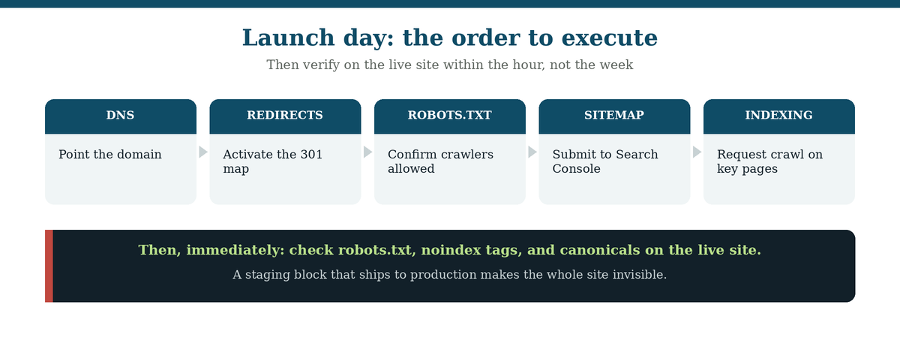
Sequence first, then immediate verification on the live site.
22. Execute the launch sequence in order. DNS, then redirects, then robots.txt, then sitemap submission, then indexing requests. Doing these out of order can leave the new site briefly uncrawlable or the redirects briefly inactive.
23. Verify robots.txt, noindex tags, and canonicals on the live site. Within minutes, not days. This is the one check where hours genuinely matter, because a shipped staging block removes the entire site from search.
24. Spot-check your highest traffic redirects manually. Don’t assume the map behaved. Test the top twenty or so by hand on the live site.
25. Submit the new sitemap to Google Search Console and Bing Webmaster Tools. This prompts both to begin recrawling the new structure rather than waiting to discover it.
26. Confirm analytics and tracking scripts are firing. Check real-time data to confirm visits are recording and verify conversion tracking. Analytics that silently stop produce weeks of misleading performance data at exactly the moment you need accurate numbers.
Phase 5: After launch (steps 27–32)
Monitor against your baseline and know your thresholds in advance. Some fluctuation is normal; the point of monitoring is telling normal apart from broken.
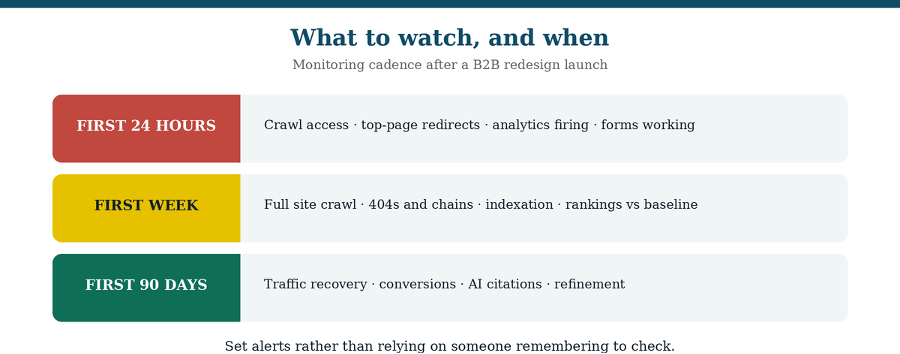
27. Crawl the full site within the first week. Look for 404s, redirect chains, broken links, missing metadata, and stray development URLs. This finds what pre-launch testing missed.
28. Re-crawl your exported list of top organic URLs. Confirm each returns the correct status code, remains indexable, and has the right canonical. Repeat periodically through the first weeks.
29. Track rankings and traffic against your pre-launch baseline. A dip in the 0 to 15% range during reprocessing is normal. Losses of 15 to 30% warrant close inspection. Beyond roughly 30% generally signals an implementation error rather than normal fluctuation.
30. Monitor indexation and crawl errors in Search Console. Set alerts rather than relying on someone remembering to check. Catching a problem in hours instead of a monthly report is the difference between an inconvenience and a quarter.
31. Re-run your AI visibility prompts. Compare against the Phase 1 baseline. Expect this to lag your search recovery, since AI systems recrawl on their own timelines.
32. Track conversions, not just traffic. The point of a website is leads, not sessions. Verify that forms, bookings, and downloads are working and recording, and watch conversion rate alongside traffic through the first quarter.
If your domain is changing
A domain change adds one critical step and a longer timeline. Use Google Search Console’s Change of Address tool to formally signal that the whole site has moved. This helps search engines transfer signals to the new location more efficiently, though the transition still takes time even when everything is configured correctly.
Domain moves are the highest-risk category of redesign because several variables change simultaneously. If you’re changing domain, platform, and design all at once, consider whether they can be sequenced instead, so that if something breaks you can tell which change caused it.
The short version
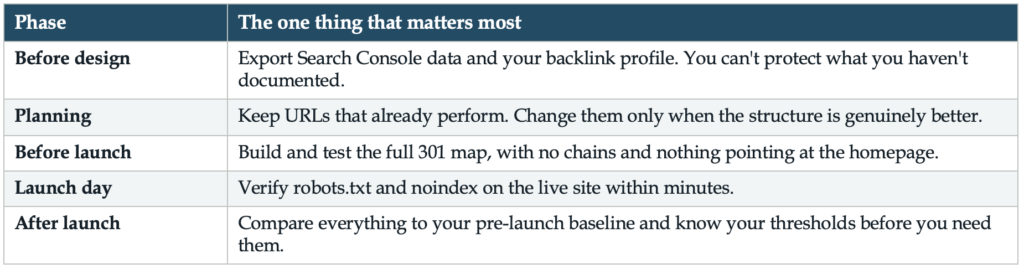
If you remember nothing else from this list, these are the checks that prevent the most damage:
For the full phase-by-phase process this checklist supports, see the Website Redesign SEO & AI Search Readiness Roadmap. For the specific mistakes behind most redesign traffic losses, see How to Avoid Ruining SEO During a Website Redesign.
Frequently asked questions
What should be on a website redesign SEO checklist? Five phases: documenting current performance and backlinks before design begins, deciding each page’s fate and URL during planning, building and testing the 301 redirects map before launch, executing the launch sequence and verifying crawl access on the day, and monitoring against your baseline afterward. Sequence matters as much as completeness.
What should you do before starting a website redesign? Export twelve months of Search Console data, pull your backlink profile, crawl and inventory every URL, record on-page elements for top pages, set up rank tracking at least a week ahead, and capture an AI visibility baseline. This documentation is what you’ll protect and what you’ll measure against.
What should you check immediately after launching a redesigned site? Within minutes: robots.txt, noindex tags, and canonical tags on the live site, plus manual spot-checks of your highest-traffic redirects. Then submit the sitemap and confirm analytics and conversion tracking are firing. The staging-block failure is the one where hours genuinely matter.
How long should you monitor a site after a redesign? Daily in the first week, then regularly across the first 90 days. Watch rankings, traffic, indexation, crawl errors, AI citations, and conversions against your pre-launch baseline, with alerts configured rather than relying on manual checks.
Do I need a checklist if my developer is handling the redesign? Yes. Developers execute technical work; they generally don’t decide which pages carry backlinks, which URLs are worth preserving, or what constitutes an acceptable traffic dip. Those are marketing decisions, and this checklist is the marketing side of the project.
What if my site doesn’t get much organic traffic today? Then you have more freedom to restructure, and preservation matters less. Check first: if the site earns little organic traffic and has few backlinks, a redesign is a lower-risk opportunity to build a better structure. The documentation steps still apply, they’re just faster.
This article explains the reasoning. If you want the working version to use during the project, the Master Website Checklist for AI Readiness is the fillable checklist covering what search engines and AI systems need from your new site, built to be worked through page by page.