


The specific mistakes that cost B2B companies their organic traffic, why each one happens, and how to prevent it before launch day.
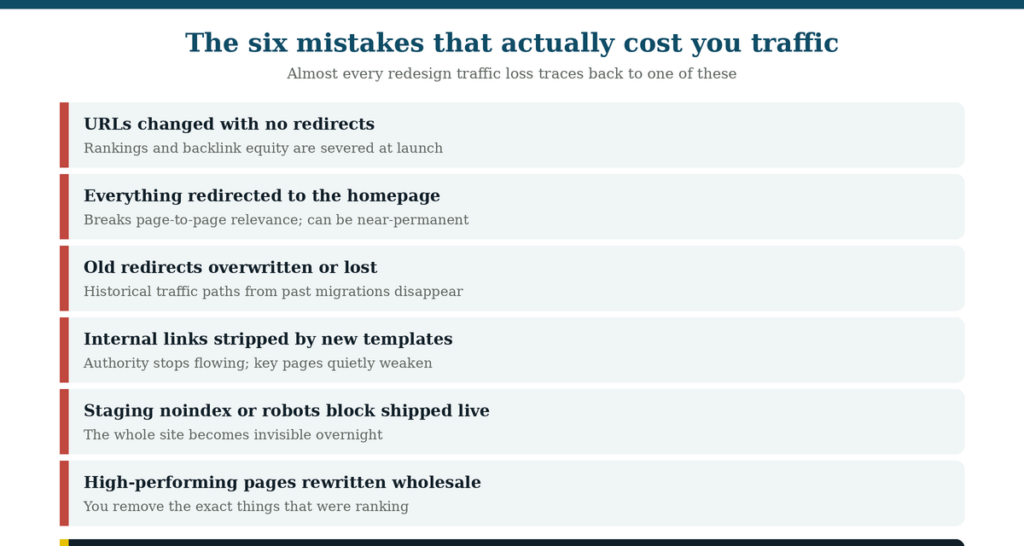
Almost every redesign traffic loss traces back to one of these six.
Most redesigns that lose traffic don’t lose it because of anything exotic.
They lose it because of a small number of specific, well-documented mistakes, each of which is cheap to prevent and expensive to fix afterward. The pattern is remarkably consistent: the project focuses on how the site looks, the SEO factors that made the old site rank get overlooked, and the damage only becomes visible weeks after launch when someone finally checks the traffic report.
One marketer put it bluntly after their own redesign:
“Hire an SEO professional. I didn’t, and I had a 60% drop. I didn’t ask for help because I didn’t have the foresight to see the problem.”
This guide is the preventive version of that hindsight. It covers what actually goes wrong, in the order you’ll encounter it, so you can plan around it while the redesign is still on paper.
One framing worth accepting up front: you cannot redesign a website with zero SEO impact. Search engines have to re-crawl and re-evaluate the site whenever URLs or content change. The realistic goal isn’t avoiding all change; it’s managing the transition so disruption is small, temporary, and recoverable.
First, know which project you’re actually doing.
Redesign” gets used for three very different projects, and they carry very different levels of SEO risk. Getting this straight early determines how much protection the project needs.
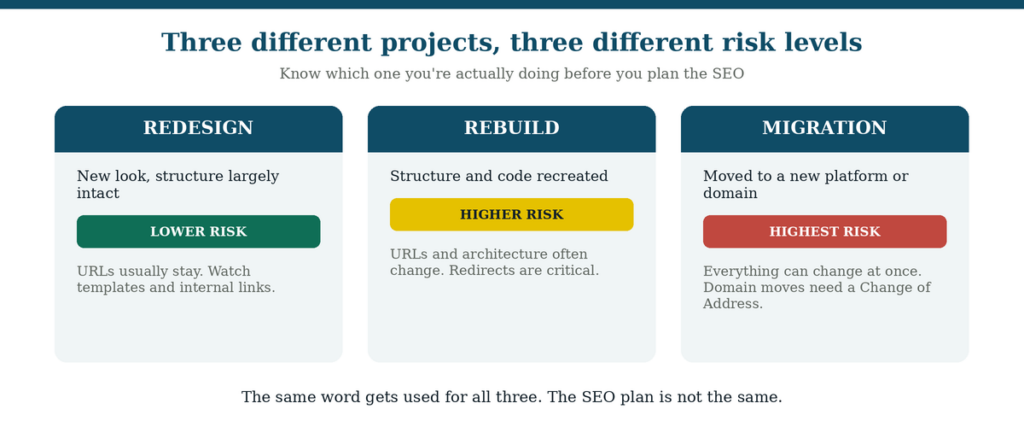
The same word covers all three. The SEO plan is not the same.
A redesign changes how the site looks and feels while leaving the underlying structure largely intact. URLs usually stay put. Risk is lowest, but not zero, because new page templates can quietly change internal linking and on-page elements.
A rebuild recreates the site’s structure and code, often on a new framework. URLs and architecture frequently change, which makes redirect mapping essential rather than optional.
A migration moves the site to a new platform or a new domain. This carries the highest risk because several things change at once. If the domain itself is changing, use Google Search Console’s Change of Address tool to formally signal the move, and expect the transition to take time even when everything is done correctly.
Name your project honestly. A team that thinks it’s doing a light redesign, but is actually doing a rebuild, will under-plan the parts that matter most.
Mistake 1: Changing URLs without redirects
This is the single most damaging and most common redesign mistake. Search engines associate rankings, backlinks, and historical performance with specific URLs. Change the address without a redirect and the new page is treated as an unrelated page starting from nothing, while the old page’s accumulated authority simply evaporates.
The prevention is straightforward, and it starts earlier than most teams expect:
- Keep existing URLs whenever you can. If a page already ranks and earns traffic, changing its URL for cosmetic tidiness introduces risk with no upside. URLs matter less than titles, headings, content, and internal links, so “cleaner” URLs are rarely worth the disruption on their own.
- Where URLs must change, map everything. Build the old-to-new mapping before launch, not during it. Every old URL needs a destination: its direct equivalent if one exists, otherwise the closest genuinely relevant page.
- Use 301 redirects, not 302s. A 301 signals a permanent move, which is what tells search engines to transfer the ranking signals.
- Avoid redirect chains. Old URL to intermediate URL to final URL dilutes equity and slows the page. Point every old URL directly at its final destination.
- Avoid redirect chains. Old URL to intermediate URL to final URL dilutes equity and slows the page. Point every old URL directly at its final destination.
There are legitimate reasons to change URLs: the existing structure is genuinely poor, the architecture is being meaningfully improved, or the current pages aren’t ranking anyway. In those cases, a well-planned redirect strategy makes the change safe. The mistake isn’t changing URLs; it’s changing them without a plan.
Mistake 2: Redirecting everything to the homepage
Never let a site-wide redirect send all old URLs to the homepage. It is the fastest way to turn a manageable migration into a lasting problem, and it happens surprisingly often because it’s the easiest rule for a developer to implement under deadline.
The reason it fails is that a redirect is a statement of equivalence: this page is now that page. When every URL points at the homepage, that statement becomes meaningless, so the page-level relevance signals are lost rather than transferred. As one practitioner warned:
If a page genuinely has no equivalent on the new site, redirect it to the closest relevant page, a parent category or a related service page. If nothing relevant exists at all, letting it return a 404 is more honest than a homepage redirect, provided the page had little value to begin with.
Mistake 3: Losing the redirects you already had
Existing redirect rules from previous migrations are easy to overwrite and easy to forget and losing them breaks traffic paths that have been working for years. This one catches even experienced teams because the redirects are invisible: nobody thinks about them until they’re gone.
Before touching anything, export your current redirect rules and keep a backup. Then re-implement them in the new environment and test them before launch. A site that has been through two or three previous updates may be carrying redirect chains going back years, and those chains are quietly delivering traffic and link equity to pages that still matter.
Mistake 4: Letting new templates strip your internal links
New page templates frequently contain fewer internal links than the ones they replace, and the loss is almost invisible during design review. Internal links route authority through your site and tell search engines how pages relate. Remove them and important pages weaken without anything obviously breaking.
There’s a simple diagnostic for this, and it’s worth building into your QA: compare templates directly. Count the internal links on the old category page and the new one. Do the same for service pages, blog posts, and any other repeating template. If the new version has noticeably fewer, ask why.
The goal isn’t to preserve every link mechanically; it’s to make sure the new site links at least as purposefully as the old one did. Also check that links are real, crawlable anchors, since JavaScript-only navigation and empty anchor elements are a common way for links to exist visually but not functionally.
Mistake 5: Shipping staging controls to production
A noindex tag or a robots.txt block carried over from staging can make an entire site invisible overnight. This is the most catastrophic single failure on the list and also one of the easiest to prevent.
Staging environments should be blocked from indexing, that part is correct. The failure is when those controls ship with the launch. Add explicit verification to your go-live checklist: confirm robots.txt on the live site doesn’t block crawlers, confirm no important page carries a noindex directive, and confirm canonical tags point where they should rather than back at a staging domain. Check this within minutes of launch, not days. It’s the one issue where hours genuinely matter.
Mistake 6: Rewriting the pages that were already working
A redesign creates a strong urge to rewrite everything, and rewriting your best-performing pages is how you accidentally delete the reasons they ranked. If a page earns meaningful traffic today, its titles, headings, keyword focus, and structure are doing something right.
The safer default is asymmetric: preserve what performs, improve what doesn’t. For high-performing pages, keep titles, headings, keyword targeting, and core content structure largely intact through the migration; refresh the design around them rather than replacing the substance. For weak pages, the redesign is a genuine opportunity to improve targeting and structure, because there’s little to lose. Which requires knowing which is which, and that’s the deeper mistake underneath this one.
The mistake underneath all the others: not knowing why you rank now
Most redesign damage happens because nobody documented why the current site performs before changing it. You cannot protect what you haven’t identified.
Before any structural decisions get made, establish the baseline:
- Export twelve months of Search Console data so you know which pages and queries actually drive traffic. On most sites the majority of organic traffic concentrates in a small handful of pages.
- Pull your backlink profile and document every URL receiving external links. These pages need protection even if their content is weak.
- Set up rank tracking at least a week before launch so you have stable pre-launch numbers to compare against.
- Export your top organic URLs (top 50, 100, or more depending on site size) as a monitoring list, you’ll re-crawl after launch.
- Note existing internal linking patterns, page titles, headings, and image alt text on the pages that matter. Images that earn search traffic lose it when their alt text is discarded during migration.
This baseline does double duty: it tells you what to protect, and it’s the only way to distinguish a normal post-launch wobble from a genuine problem.
What a normal post-launch dip looks like
Some ranking fluctuation after launch is expected and not a sign of failure. Search engines need time to crawl the new pages, process redirects, and re-evaluate content. The question is how much movement is normal.
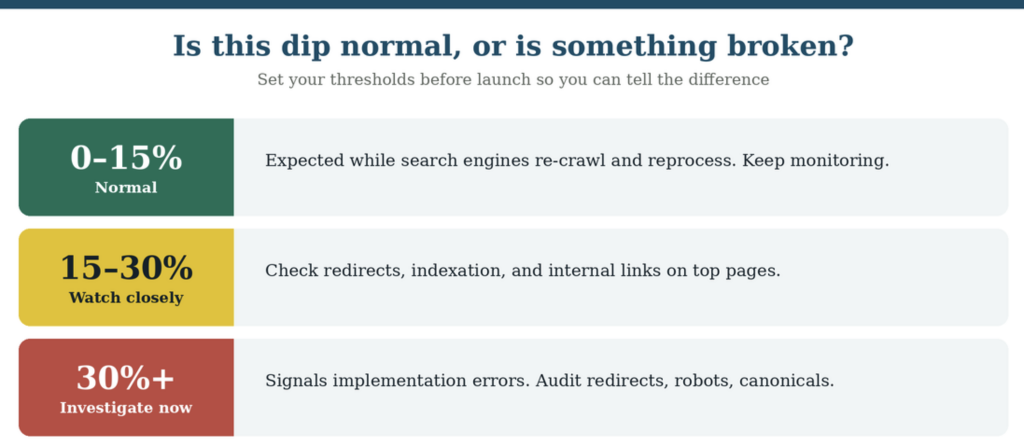
A well-executed migration typically shows a modest, temporary dip that recovers as search engines reprocess the site. Recovery timelines vary with scale: some sites stabilize within days, others take weeks, and large or complex migrations can take months. One practitioner described a typical good outcome this way:
“I lost rankings for about four days. Most things came back to pre-launch rankings after about ten to twelve days. After that things continued to improve.”
Drops beyond roughly 30% are a different signal. That range generally indicates an implementation error rather than normal reprocessing, and the first things to check are redirects, robots.txt, noindex directives, canonical tags, and internal linking on your top pages.
A word of caution in the other direction too: an immediate ranking jump right after launch isn’t proof of success either. Early volatility can settle back. Give it a few weeks before drawing conclusions in either direction.
When to consider rolling back
Rollback means reverting to the old site, and it should be a last resort rather than a normal response to a bad week. Reverting is itself a second migration event: it adds another round of crawling and re-evaluation on top of the disruption you’ve already caused.
That said, the option should exist. Before launch, make sure the old site is fully backed up and genuinely restorable, and confirm with your developers how long a rollback would take. Having the option costs nothing; needing it and not having it is how a bad launch becomes an existential one.
Rollback is worth considering in a narrow set of situations: the wrong version of the site is live, a sitewide noindex or robots block shipped and can’t be reversed quickly, large numbers of pages return errors, or traffic collapses almost completely within the first day or two from a cause you can’t identify. These are catastrophic technical failures, not SEO fluctuations. Almost everything else is a fix-forward situation. A missed batch of redirects gets added. A template that lost internal links gets updated. Rankings that wobble while search engines reprocess get monitored and given time. The instinct to revert at the first sign of a dip usually causes more churn than it prevents, which is exactly why the pre-launch benchmark matters, it lets you tell a real emergency from an expected one.
The prevention checklist, in order
Most of this article compresses into a sequence. Work it in this order and the six mistakes largely can’t happen.
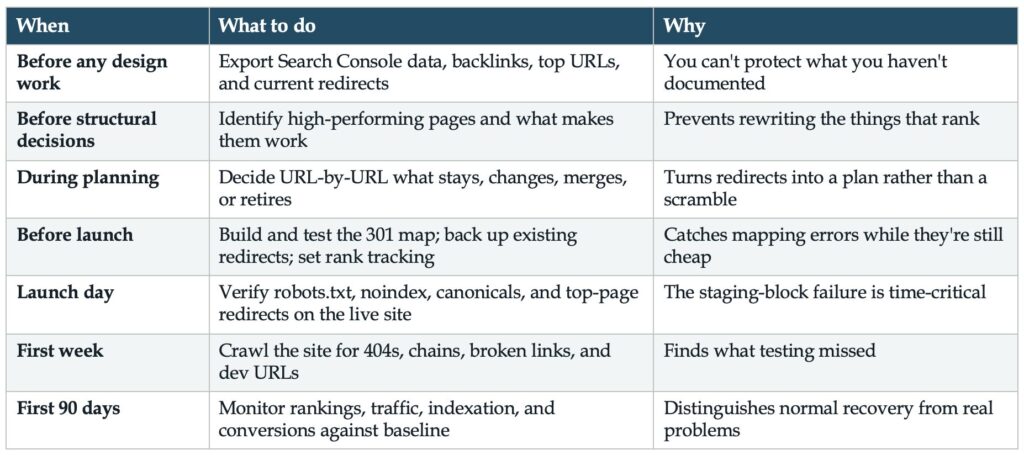
For the complete phase-by-phase process this checklist sits inside, see the Website Redesign SEO & AI Search Readiness Roadmap. For the structural decisions that prevent most of these problems before they start, see Website Architecture Ideas for an SEO and AI-Search-Ready B2B Redesign.
Frequently Asked Questions
Will a website redesign hurt my SEO? Some impact is unavoidable, because search engines must re-crawl and re-evaluate pages whenever URLs or content change. A well-planned redesign typically causes a modest, temporary dip that recovers within days to weeks. Significant lasting damage almost always traces to a preventable mistake, most often missing or poorly mapped redirects.
How much traffic loss is normal after a redesign? A dip in the range of 0 to 15% during the reprocessing period is normal. Drops of 15 to 30% warrant close inspection of redirects, indexation, and internal links. Losses beyond roughly 30% generally indicate an implementation error rather than normal fluctuation.
Should I change my URLs during a redesign? Keep them if the current pages already rank and the structure is reasonable, since URLs carry less weight than titles, headings, content, and internal links. Change them when the existing structure is genuinely poor or the architecture is being meaningfully improved, and map 301 redirects for every change.
What is the worst redirect mistake in a redesign? Redirecting all old URLs to the homepage. A redirect tells search engines that one page is equivalent to another, and pointing everything at the homepage destroys page-level relevance rather than transferring it. Each old URL should point to its closest genuine equivalent.
How long does it take to recover from a redesign? It varies with scale. Small sites often stabilize within days to a couple of weeks; larger or more complex migrations can take months. Plan for daily monitoring in the first weeks and structured review across the first quarter.Should I roll back if traffic drops after launch? Rarely. Rollback is a second migration event and adds disruption. Reserve it for catastrophic failures: the wrong site live, a sitewide noindex or robots block that can’t be reversed quickly, mass errors, or near-total traffic loss in the first day or two. Most issues, including missed redirects and template problems, are better fixed forward.
Planning a redesign? Work through the Master Website Checklist for AI Readiness before your build begins, it covers what search engines and AI systems need from the new site. And if you want a diagnostic picture of what your current site is carrying, and therefore what needs protecting, the Paid Search Readiness Audit is worth running before the redesign starts.