Let’s zoom in on what’s actually happening the moment your prospective customer decides to search.
Picture this. A question pops up. A need. A problem. Something you want to figure out.
And almost automatically, you think:
“Google it.”
That reaction is so natural now that we barely notice it. But as a marketer, this moment is everything. So, let’s slow it down and look at what’s happening before you type a single word.
What We’ll Call “The Keyword or Search Query ”
For simplicity, let’s call whatever you’re trying to solve the query.
That query could be:
- A question
- A problem
- A situation
- A prompt
Before you search or ask a tool like Gemini or ChatGPT your brain already does some quiet work. It puts that query into two mental frames.
The Two Mental Frames Behind Every Search
1. The Query Frame (how to ask)
This is about how you ask. Your brain is deciding:
- What words should I use?
- Should I ask a question or type a phrase?
- How specific do I need to be?
This frame shapes the actual search terms you choose.
2. The Solution Frame (what the answer should look like)
This is about what you expect the answer to look like.
Even if you know almost nothing about the topic, you still imagine:
- How much it might cost
- Where it should be located
- What “good quality” means
- What would make a solution acceptable
These expectations act like filters guiding which results feel relevant and which get ignored.
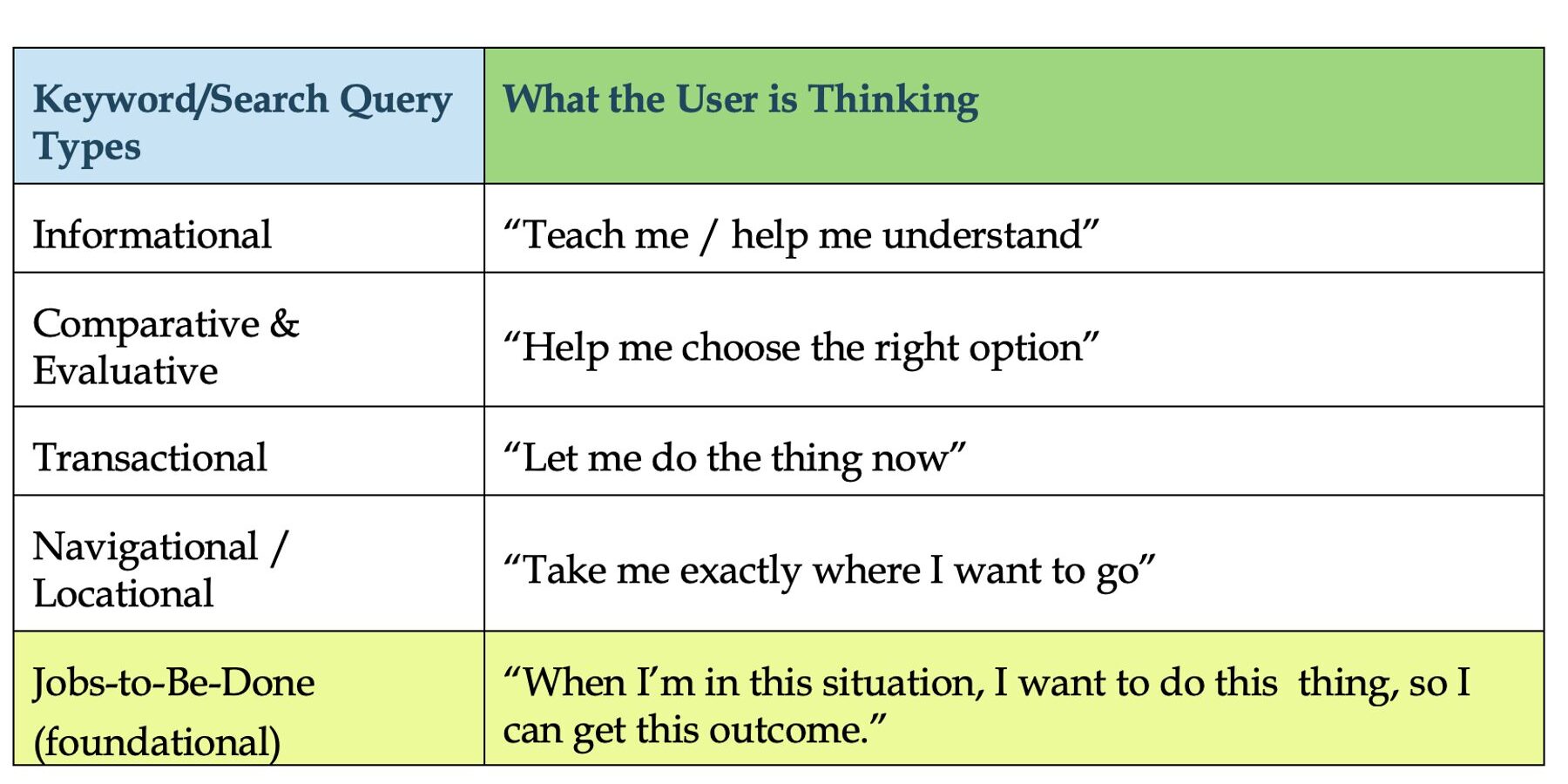
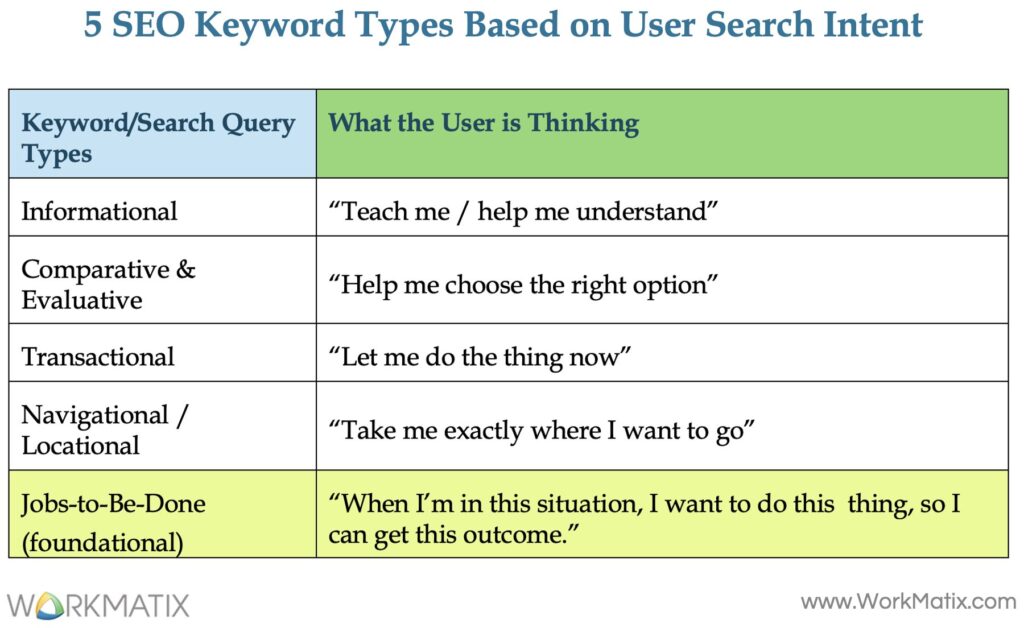
The SEO Keyword Classification System: the 5 Main Search Query Types
Think of search activity as progressive problem-solving.
Each query type answers a different question in the user’s mind. The mistake most marketers make is treating these query types as separate buckets.
In reality, they’re connected steps in the same decision journey and Jobs-to-Be-Done is the thread that ties them all together.
The Jobs-To-Be-Done Lens: The Hidden Driver of Search Behavior
Before any search happens, a situation happens that later becomes the search trigger.
“When I’m in this situation, I, as a type of user, want to do this thing, so I can get this outcome.”
That internal sentence is the “job” which is the foundation of the decision. These queries help identify the functional, emotional, and social goals customers try to achieve by “hiring” a product. Your job as a marketer is to:
- Identify the situation
- Understand the motivation
- Deliver the outcome clearly
All other search queries are simply different expressions of that job as the person moves forward.
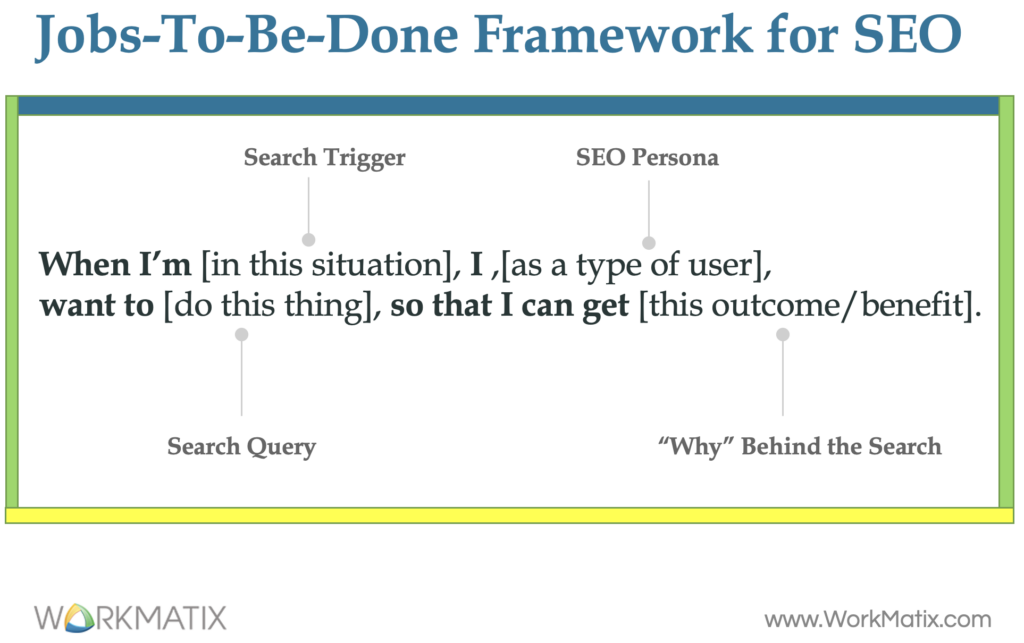
Example of the Job-To-Be-Done Statement: Website Redesign + SEO
“When I’m planning a website redesign, I want to make sure SEO is built in from the start, so I don’t lose traffic or rankings and ideally increase visibility in search & AI systems.”
This job quietly drives everything that follows.
1. Informational Keywords/Search Queries
“Teach me / Tell me more”
This is where the user is problem-aware but solution-uncertain.
They’re trying to understand:
- what’s involved
- what can go wrong
- what they need to know
Examples
- “what is SEO website redesign”
- “does redesigning a website hurt SEO”
- “how SEO works during a website migration”
These queries help users frame the problem correctly.
2. Comparative & Evaluative Keywords/Search Queries
“Help me choose the right thing”
Now the user knows what the problem is and is weighing options.
They’re comparing:
- approaches
- providers
- tradeoffs
Examples
- “SEO consultant vs SEO agency for website redesign”
- “best SEO checklist for website redesign”
- “in-house SEO vs external SEO advisor”
- “best b2b SEO agency near me”
This is where positioning, authority, and clarity matter most.
3. Transactional Keywords/Search Queries
“Let me do the thing”
At this stage, intent is high. The user has made up their mind and is ready to act.
Examples
- “hire SEO consultant for website redesign near me”
- “SEO migration consulting pricing”
- “book SEO website audit”
- “free SEO agency consultation Eden Prairie MN”
This is conversion territory. Remove friction.
4. Navigational / Locational Keywords
“Take me there”
Once the decision is made, search becomes a shortcut.
Examples
- “free SEO agency consultation Eden Prairie MN”
- “WorkMatix SEO consulting website”
- “WorkMatix SEO advisory booking”
- “SEO consultant near me”
This is about access, trust, and ease; not persuasion.
Another Quick Example: B2C (Standing Desk)
Job-To-Be-Done:
When I work long hours at home, I want a desk that reduces back pain, so I can feel better and stay productive.
- Informational search query:
“are standing desks good for back pain”
- Comparative search query:
“best standing desk for home office”
- Transactional search query:
“buy adjustable bamboo standing desk”
- Navigational search query:
“fully Jarvis standing desk Herman Miller website”
Same job. Different moments.
The Search Intent Flow: How These 5 SEO Keyword Types Interrelate
As I mentioned above, SEO keywords/search queries usually fall into 5 big buckets:
- Informational – “Teach me/Tell me more about it”
- Comparative & Evaluative – “Help me choose the right thing”
- Transactional – “Let me do the thing”
- Navigational / Locational – “Take me there”
- Jobs-To-Be-Done Driven – “When I’m in this situation, I want to do this thing, so I can get this outcome.”
The job stays the same. Only the language evolves. Here’s the real connection:
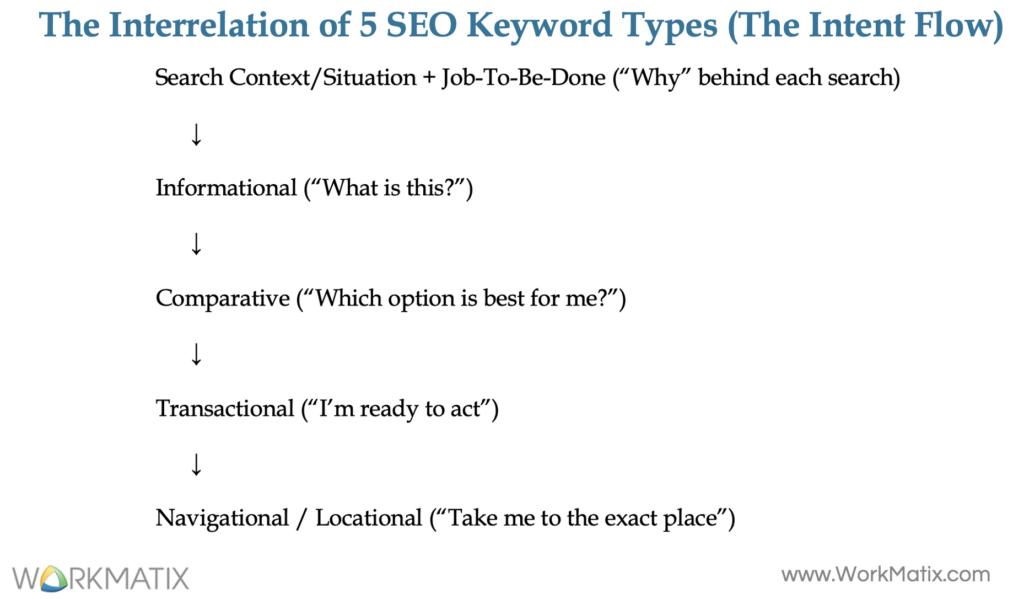
How Jobs-To-Be-Done Queries Shows Up in Search
Let’s break this into common patterns you’ll actually see in Google.
Examples of JTBD-Based Search Queries:
1. Productivity or Tool-Focused Jobs
These searches are about doing work better.
What’s really going on:
“I’m overwhelmed or inefficient, and I want relief.”
Example:
- “Best project management software for remote teams to reduce meeting time”
Hidden job:
Reduce friction → save time → feel in control again.
2. Convenience & Speed Jobs
These are classic “help me now” searches.
What’s really going on:
“I don’t have time or energy for this.”
Example:
- “Fastest way to get healthy dinner on the table for kids”
Hidden job:
Lower effort → reduce stress → still feel like a good parent.
3. Problem-Solving Jobs
This is about avoiding pain: financial, emotional, or physical.
What’s really going on:
“I want to fix this without making it worse.”
Example:
- “How to fix a leaky faucet without hiring a plumber”
Hidden job:
Save money → avoid hassle → feel capable.
4. Service & Process Improvement Jobs
Very common in B2B.
What’s really going on:
“My systems are messy, and it’s costing me.”
Example:
- “Automate invoice tracking for small business to improve cash flow”
Hidden job:
Create stability → reduce anxiety → run a healthier business.
5. Information & Guidance Jobs
These usually show up at moments of uncertainty.
What’s really going on:
“I don’t want to mess this up.”
Example:
- “How to prepare for a first-time home buying process”
Hidden job:
Gain clarity → feel confident → make a smart decision.
6. Lifestyle & Outcome-Based Jobs
These are about how someone wants to feel.
What’s really going on:
“My environment is blocking my best work.”
Example:
- “Find a quiet co-working space near me to focus and be productive”
Hidden job:
Remove distractions → increase focus → feel accomplished.
7. B2B & Efficiency Jobs
These are deeply tied to professional identity.
What’s really going on:
“I want to look competent and in control.”
Example:
- “Best CRM for tracking client interactions for freelance consultants”
Hidden job:
Stay organized → appear professional → grow the business.
SEO truth bomb:
These queries often inside searches like “how to,” “best,” “tools to help with…” and “alternative to”, as they reveal the user’s underlying struggle and the “job” they need to accomplish.
Why This Matters for SEO
Traditional keyword research asks:
“What words are people typing?”
Jobs-To-Be-Done keyword research asks:
“What problem are they trying to solve right now and why?”
When you optimize for the “job-to-be-done driven queries”:
- Your content feels more relevant
- Your messaging matches real intent
- Your pages convert better, not just rank in Google search results.
Key Takeaways
- JTBD queries reveal intent, motivation, and desired outcome
- They focus on situations, not just products
- They blend functional, emotional, and social goals
- They’re gold for persona profiling and content strategy
- If your page solves the job clearly, Google and users reward it
Informational Keywords/Search Queries
Informational search queries are when people are looking to learn & explore, not buy, at least not yet.
They’re asking questions, trying to understand a topic, or figuring out how to solve a problem. There’s no credit card out. There is curiosity.
And here’s the key thing to remember:
Most of all search queries are informational.
That’s why this content usually sits at the top of the funnel (TOFU): blogs, guides, tutorials, videos. These are queries where users seek knowledge, answers, or “how-to” guides (e.g., “how to fix a sink,” “what is SEO”).
These queries often include:
- Question words (who, what, where, why, how)
- Words like tips, guide, steps, ideas
Now let’s break down the main types so you can recognize them instantly.
1. “How-To” & Instructional Queries
People want step-by-step help.
This is the most obvious informational intent. The user knows what they want to do but they just don’t know how.
Common signals
- “how to”
- “steps”
- “guide”
- “DIY”
Examples
- “how to change a flat tire”
- “how to bake rye bread”
- “steps to fix a leaky faucet”
- “DIY home insulation guide”
How to think about this as a marketer
They’re raising their hand saying: “Teach me.”
This is perfect for:
- Tutorials
- Walkthroughs
- Checklists
- Educational videos
2. General Knowledge & Broad Topical Queries
People want to understand something.
Here, users aren’t solving a specific problem yet. They’re building context.
These searches are often:
- Shorter
- Broader
- More conceptual
Examples
- “what is search intent in SEO”
- “who invented the telephone”
- “definition of inflation”
- “why do leaves change color”
- “types of Pilates”
- “running tips for beginners”
How to think about this
They’re saying: “Help me understand the landscape.”
This content builds:
- Authority
- Trust
- Topical relevance
3. Exploratory, Factual & Research-Based Queries
People are gathering data or exploring options.
These users want facts, stats, or evidence. Sometimes they’re researching for work. Sometimes curiosity. Sometimes early decision-making.
Examples
- “population of Belarus 2026”
- “average rainfall in Florida in summer”
- “marketing trends 2026”
- “what are the best ways to learn Python?”
How to think about this
They’re in research mode.
They want accuracy, clarity, and credibility.
This is where:
- Data-driven content
- Trend reports
- Research summaries really shine.
4. Diagnostic & Problem-Solving Queries
Something’s wrong, help me fix it.
These are highly valuable informational queries. The user describes a symptom, hoping to find the cause or solution.
Examples
- “why is my laptop running slow”
- “fix error 404 WordPress”
- “symptoms of oily skin”
- “dog eating a rabbit consequence”
How to think about this
They’re saying: “Something’s broken. Help.”
This is where you:
- Identify the problem
- Explain why it’s happening
- Introduce solutions (softly)
Perfect bridge content toward services or tools.
5. Inspiration & Idea-Brainstorming Queries
People want inspiration.
These users are early-stage thinkers. They’re collecting ideas, examples, and inspiration.
Common signals
- “ideas”
- “examples”
- “best time”
- “inspiration”
Examples
- “examples of landing pages”
- “blog topic ideas”
- “best time to post on social media”
- “innovative office layouts”
How to think about this
They’re saying: “Show me what’s possible.”
This is great for:
- Swipe files
- Curated examples
- Framework-based content
How This All Ties Back to SEO Strategy
Informational queries:
- Drive awareness
- Build trust
- Position you as the expert before someone is ready to buy
They may not convert today but they shape who gets chosen tomorrow.
Key Takeaways
- Informational queries dominate search traffic
- They signal learning, not buying
- Different types of informational intent need different content formats
- This content fuels the top of your funnel
- Strong informational content sets up future conversions.
Comparison & Evaluative Keywords/Search Queries: Why They Matter So Much?
Comparison search queries are search terms used by potential customers in the final stages of the search journey to weigh their options, validate their choices, and ensure they are getting the best value.
When someone types a comparison query into Google, they’re not just browsing.
They’re:
- Problem-aware
- Solution-aware
- Very close to buying
At this stage, they’re asking: “Which option should I choose and why?”
The Role These Queries Play in the User Search Journey
Think of comparison queries as the final checkpoint before purchase.
Your prospect is:
- Validating their short list (consideration set)
- Looking for reassurance
- Trying to avoid making the “wrong” choice
Your job?
Make it easy for them to choose you.
How Users Behave in a Comparative/Evaluative Stage of the User Search Journey
Here’s what’s really happening behind the scenes.
Users will:
- Google it
- Expand AI Overviews (AIO) for quick comparisons
- Scroll, refine, and interact with comparison features
- But keep going
Instead of stopping at one result, they:
- Jump to YouTube reviews
- Read Reddit threads
- Visit vendor websites
- Cross-check opinions
This is validation, not discovery.
They’re asking:
“Am I about to make the right choice?”
SEO Keywords That Signal Comparative/Evaluative Intent
You can spot this behavior easily in search data.
Common examples include:
- “Notion vs Asana for teams”
- “Best mirrorless camera under $2,000”
- “Standing desk benefits and risks”
- “Programmatic SEO examples B2B”
These queries mix:
- Comparison
- Evaluation
- Risk reduction
Types of Comparative & Evaluative Queries
Let’s go through the main categories one by one.
1. Head-to-Head Comparisons
These are direct, “X vs. Y” searches where clients compare your brand against a specific competitor. This is the most obvious (and most powerful) type.
These searches literally put you side by side with a competitor.
What the user is thinking:
“Which one is better for me?”
- Examples: “[Brand A] vs [Your Brand],” “[Your Product] vs [competitor alternatives],” “Pros and cons of [Your Brand]”.
Marketing truth bomb:
If you don’t create this page, someone else will and they may not be kind to you.
2. Best-of & Listicle Queries
Here, the buyer wants options but curated ones. They look for curated lists to discover the top players in the market.
What the user is thinking:
“Show me the top choices so I don’t waste time.”
- Examples: “Best [Service Type] for [Target Audience],” “Top 10 [Software Category] 2026,” “Best budget [Product] for [Specific Need]”.
Marketing truth bomb:
These are perfect for authority-building content and soft selling.
3. Price and Value Comparisons
Now we’re talking about money anxiety. These queries aim to identify the most cost-effective option, taking into account total cost, including shipping or subscription fees.
What the user is thinking:
“Is this worth what I’m about to pay?”
- Examples: “[Your Product] pricing,” “[Your Product] cheaper alternative,” “Affordable [Service] for small business,” “Is [Your Product] worth it”.
4. Feature-Specific & Use-Case-Driven Queries
These searches get very practical, very fast. Prospective clients often compare technical specifications or how a product functions in specific scenarios.
What the user is thinking:
“Will this actually work for my situation?”
- Examples: “[Software] features comparison,” “Best [Appliance] for [Small Kitchens],” “[Service] API vs [Competitor API]”.
Marketing truth bomb:
This is where use-case pages and demos shine.
5. “Alternatives to” Known Brands
This usually means frustration or budget constraints. Users often search for alternatives to large, industry-standard, or expensive companies.
What the user is thinking:
“I like this brand, but I want something better / cheaper / simpler.”
- Examples: “Alternatives to [Big Competitor],” “Cheaper [Big Competitor] alternative,” “[Your Product] similar to [Competitor]”.
6. Validation, Review and Feedback Searches
This is pure trust validation. Buyers look for social proof to trust that your solution delivers on its promises.
What the user is thinking:
“Did this actually work for people like me?”
- Examples: “[Your Brand] reviews,” “[Your Product] testimonials,” “Complaints about [Competitor],” “User experiences with [Your Brand]”.
Marketing truth bomb:
You’re not just selling, you’re reducing perceived risk.
These are moments when consumers think:
“Can I trust this?”
“Is this safe?”
“Is this legitimate?”
How to Optimize for Validation, Review & Feedback Queries
Build trust on the page
- Use expert reviewers
- Add citations and sources
- Show “last reviewed” dates
Match authoritative language
- Mirror official terminology
- Link to primary or regulatory sources
Guide next steps
- Add clear “What to do next” sections
- Align advice with recognized authority guidance
Strengthen E-E-A-T signals
Experience, Expertise, Authoritativeness, and Trustworthiness matter most here.
Trust validation content also needs to work well in AI-powered results.
To do that:
- Summarize key facts in:
- TL;DRs
- FAQs
- Structured data (schema)
- Place:
- Definitions
- Checklists
- Examples near the top of the page
- Use:
- Simple tables
- Step-by-step lists
- Make sure:
- Brand mentions
- Key facts appear early for visibility
How This Translates into SEO & Content Strategy
Across all these query types, you’ll notice repeat language patterns:
Common keywords to look for:
- vs
- compare
- best
- top
- reviews
- price
- alternatives
SEO truth bomb:
If you want to win here, one page isn’t enough. You need an ecosystem that supports comparison and reassurance.
How to Optimize for Comparative & Evaluative Searches
1. Publish Structured Comparison Landing Pages
Make comparisons easy to scan.
Use:
- Clear decision tables
- Feature-by-feature breakdowns
- Use-case-based sections
- Transparent pricing
The goal is to reduce mental effort.
2. Support Pages With Proof
Your comparison page shouldn’t stand alone.
Reinforce it with:
- Short demo videos
- Honest testimonials and reviews
- Credible community discussions
This echoes your key points across multiple formats.
3. Clarify Fit With “For / Not For” Sections
One of the biggest sources of hesitation is ambiguity. So, remove it.
Include:
- “Who this is for”
- “Who this isn’t for”
This builds trust, even if it disqualifies some users.
4. Be Where Consideration & Evaluation Happens
People validate across platforms. So, seed content in:
- YouTube
- Forums
- Community sites
These are sources both users, search engines and AI systems pick up as signals of credibility.
Key Takeaways
- Comparative/evaluative searches happen late in the decision journey
- Users rely on AIO summaries but always verify elsewhere
- Winning requires structured comparisons plus external validation
- Videos, forums, and social proof reinforce credibility
- “Who it’s for / not for” sections reduce friction
- Multi-channel presence strengthens both SEO and trust
Transactional Keywords/Search Queries
Let’s switch gears and talk about transactional search queries; this is where SEO and revenue finally shake hands.
(a.k.a. “I’m ready to act ->don’t make me think” searches)
Transactional search queries happen when a user is ready to do something right now.
That “something” might be:
- Buying a product
- Booking a service
- Signing up for an account
- Downloading a file
- Applying for something
At this point, the user is past learning and comparing. They’ve already decided what they want. Now they’re looking for the fastest, safest path to completion.
That’s why these are often called high-intent or bottom-of-funnel (BOFU) queries.
How You Spot Transactional Intent Instantly
Transactional queries almost always contain action words. Think verbs.
Common transactional modifiers
- buy
- order
- book
- sign up
- download
- get
- purchase
- reserve
- apply
- find
Types of Transactional Keywords/Search Queries
Let’s break them down by what the user wants to do.
1. Purchasing Queries
“I want to buy this”.
These users know the product, or are very close, and want to complete the purchase.
Examples
- “buy Nike Air Max 90 online”
- “purchase iPhone 17 Pro”
- “order pizza delivery near me”
- “best price Samsung s25 ultra”
What they expect
- Clear pricing
- Availability
- Fast checkout
- Trust signals (reviews, security, returns)
This is where product pages and category pages need to do the heavy lifting.
2. Service Booking & Sign-Up Queries
“I want to book or join”.
Here, the transaction isn’t a physical product: it’s access, time, or service.
Examples
- “book hotel room in Miami”
- “schedule hair appointment near me”
- “open a new bank account online”
- “sign up for Netflix free trial”
What they expect
- Easy scheduling
- Clear next steps
- Minimal friction
- Strong reassurance (credibility matters a lot here)
These queries convert best with dedicated service landing pages.
3. Download & Access Queries
“Give me the thing”.
These users are trying to access something specific: software, files, or accounts.
Examples
- “download Adobe Acrobat Reader for mac free”
- “login to Gmail account”
- “access my US bank statement online”
- “download Windows 11 media creation tool”
What they expect
- Immediate access
- Zero confusion
- No unnecessary steps
This is not the place for fluff. Clarity wins.
Transactional Keywords by Industry
Sometimes it helps to see how this shows up across different verticals.
E-commerce
- “buy new laptop online”
Local Services
- “find a dentist near 55347”
Software
- “download Spotify desktop app”
Travel
- “book flight to New York for tomorrow”
Financial
- “apply for chase credit card online”
Different industries, same mindset: “I’m ready. Don’t slow me down.”
How Transactional Queries Fit into Your SEO Strategy
Transactional queries:
- Have lower volume than informational queries
- But deliver higher conversion rates
- Require strong UX, not just keywords in the page copy
Your job here isn’t to educate; it’s to remove friction.
That means:
- Clear CTAs
- Fast load times
- Mobile optimization
- Trust and security signals
- Message match with ads or prior content
Key Takeaways
- Transactional search queries signal immediate intent
- They sit at the bottom of the funnel
- Action verbs are the giveaway
- Content must focus on clarity, speed, and trust
- These pages exist to convert, not to explain
Navigational & Locational Keywords/Search Queries
Think of navigational and locational queries as directional searches. The user isn’t exploring or comparing; they already know where they want to go. “Take me there” searches.
Navigational and locational searches are about destination, not discovery.
Navigational Keywords
“I know the brand, just get me to the page”.
Navigational queries sometimes called “go-to” queries happen when someone already knows exactly where they want to land.
They’re not shopping. They’re not researching. They’re just using Google as a shortcut.
User Intent
Go directly to a known website or digital destination.
What This Tells You as a Marketer
- Brand awareness already exists
- The decision is already made
- SEO here is about visibility and control, not persuasion
Common Characteristics
- Brand names
- Product names
- Login or account-related terms
Examples
- “Facebook”
- “YouTube login”
- “Amazon prime video”
- “Hoka running gear”
SEO Implications
- Own your brand SERP (homepage, sitelinks, knowledge panel)
- Optimize login, pricing, and support pages
- Protect against competitor ads bidding on your brand name
Locational Keywords
“I need this near me”.
Locational (or local) search queries connect online intent to real-world places. These searches are incredibly powerful because they often signal immediate action.
User Intent
Find a nearby business, service, or physical location.
Two Types of Local Intent
1. Explicit local intent
The user names the location directly.
Examples:
- “coffee shops in Eden Prairie”
- “Minneapolis restaurants open now”
2. Implicit local intent
The search relies on the user’s current location.
Examples:
- “plumber near me”
- “Whole Foods near me”
Google fills in the blanks.
What This Tells You as a Marketer
- The user is time-sensitive
- Sometimes convenience matters more than brand loyalty
- Visibility in Maps, local packs, and mobile results is critical
If you’re not optimized locally, you’re invisible, no matter how good your service is.
Key Takeaways
- Navigational searches mean brand awareness is already there
- Locational searches mean action is close
- These queries aren’t about persuasion; they’re about access
- SEO success here = clarity, accuracy, and trust
- Local optimization is critical for service-based and brick-and-mortar businesses