
Step-by-Step Guide: from Scratch to Launch
Want to build a website for your company? You could pass it off to a professional web design agency. But it’ll cost you thousands of dollars, and you may have to budget weeks, or even months, to see the finished site. That’s time you may not be able to afford to waste in getting your venture off the ground. On the other hand, you could create a website yourself. If you have a little time and feel reasonably comfortable using everyday software, you could build an incredibly professional business website using one of our recommended approaches.
Want to get your small business online but don’t know where to start? Follow the 5 simple steps in this guide to have your small business website up and running in no time:
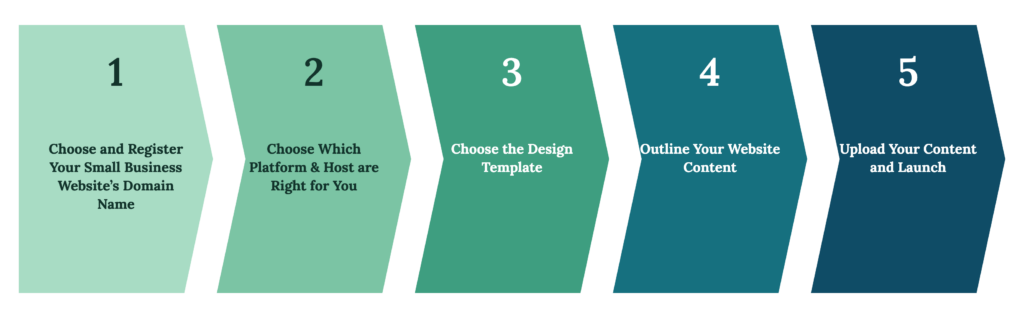
Step 1: Choose and Register Your Small Business Website’s Domain Name
A good domain name
First thing comes first: when you register a domain name for your website, don’t just take the cheapest. Your website’s domain name is your online address. This is where people can find you. So, make it memorable and simple. Although people tend to find your site through a branded search in Google, it’s still important to make your domain easy to spell / type out. You don’t want to have an amazing website that no one can ever remember to tell their friends about because they can’t remember the name of the site.
Your domain also reflects your brand’s image. Make sure it communicates something fundamental about it. Even if the exact name is not available, get creative and find one that will help you build your brand’s reputation. A pro tip: if possible, avoid dashes and numbers as they can create confusion both for the search engines and for your customers.
Logo
Speaking of design, don’t forget to create your logo before you create the website. It’s your brand’s identity. Some website builders, such as Wix, have logo builders built in. If not, Logaster.com is great site where you can generate a logo free of charge.
Keywords
You’ll also want a website name and website content that’s search engine-friendly, so your site content appears in search results for your target keywords, and helps to attract your target customers. Think through the keywords that you would like to be found for and strategize how to insert them into domain and website copy.
Step 2: Choose Which Content Management Platform & Host are Right for You
What platform will be used for managing content on my website? We normally use WordPress. It’s hard to believe that one of the best website builders for small business is free, but that’s exactly what WordPress is, because it’s flexible, scalable and easy to use. Also, you’ll have to pay for your domain name and hosting. Domains cost about $14.99 per year, and Amazon hosting costs around $19.99 per month. Once you’ve picked a domain name, you need to register it and then point your domain name to your hosting server.
Step 3: Choose the Design Theme.
A “Theme” in a nutshell is a collection of files that you can download from WordPress that work together to produce the front end styling of your website.
The web is full of ugly websites that look like they have been extracted from a history book. But, there are plenty of sites that have an appealing design. Luckily, you don’t have to pay a fortune to a web designer to create a professionally looking site.
With WordPress you have access to literally thousands of themes designed by WordPress developers to help you make your site look great. If you’re looking for something a bit more professional, more design led and more robust then premium themes might be what you’re looking for. For example, you can pick any pre-made website at https://the7.io/#!/demos. They all can be imported in a few clicks, mixed and matched to become a solid foundation for your site. All the pre-made themes here are functional, good-looking and mobile-friendly.
So, you’ve purchased your domain name and hosting and now it’s time to make your website function. The first thing you need to do is install WordPress. Sounds hard, but it’s not: most web hosts will have the 1-click-installation integrated as standard within their dashboard.
Some web designers / developers like to install WordPress manually to get a custom install of the components they want and don’t want. Others will need to manually install because their web host does not have the “1-click-installation” capability. If this applies to you then you’ll need to have a quick read through of my Manual WordPress Set-Up Guide. To help you with that, usually, there is a service available through the technical support of the theme creator. After the theme installation you can start uploading the content to your website.
If you don’t want to head down the road of building your own self hosted WordPress site, then you could sign up to WordPress.com. This is the free version of WordPress where you can get your site up and running in no time and with no costs. Another option would be to set yourself up with Wix or Weebly site, where you can get yourself a free account and use their drag and drop functionality to create your website.
Step 4: Outline Your Website Content
When preparing content for your small business website, think about your users’ needs. What do they want to know? What services do you provide? Are there any questions they have that you have the answer for?
The basic website pages you need, such as the homepage, about page, services page, and contact page. More complex features may include image galleries and video content.
Among the other website elements that some businesses may need or want, there are blogs, booking or reservation systems, membership features, or an online store.
There’s a huge library of goodies for you to use at Envato Elements, which range from ready-to-use stock images for your blog posts, web templates to fonts, backgrounds and much more.
Create content for each page + select any images you want to use
Don’t forget about the keywords: think of about 10 keywords or terms that describe your website in the best way possible. When you have a good bunch of them you can then start to put them together, mix them up, add prefixes & suffixes to create some really cool domain name ideas.
If your website information is perishable, make sure you keep it up-to-date. We can guide you through what kind of content helps leverage fantastic websites. For professional writing services, Fiverr website has many talented writers.
Testimonials
If you’re trying to sell something online, or even just promoting your products and services, there is no better form of marketing than your customers’ words. Ask some of them to give you their feedback and post it on your website. It will work wonders for your credibility.
About Us and Contact Us
You’ve decided to build a website so that more people can find out about you, your products and services. Consider including an ‘about us’ page, where you can tell them all they need to know about the company, your philosophy and your values.
You might also consider including an FAQ page, and a ‘contact us’ section, letting people know how they can get in touch should they have a question or need more details.
Call-to Action
Last, but not least: don’t forget to include a ‘call-to-action’. It’s important to tell your website’s visitors what you expect them to do: buy your product online, place an order, write you a message, get a free quote, etc.
Step 5: Upload Your Content to the Website and Launch!
After finishing the content upload, you can notify your webmaster to launch the website and make it available for the public. Getting found is a separate job from getting online, and it is the one WorkMatix exists to do.
The time has come to promote your new website. Here are some of the options:
Now that you have a website and know how to use it, it’s time to figure out how you’re going to get visitors to the site. Contact us to learn more or check out these free courses from Google: Get a business online and Make sure customers find you online. Google’s SEO Starter Guide is the plain-language reference for what a new site needs in order to be found at all.
Getting a site live is the first step, not the finish line. The Website Redesign SEO & AI Search Readiness Roadmap covers what has to be true for that site to be found once it exists.